
Read More
India has emerged as one of the most promising destinations to invest in startups, driven by rapid digital growth and a large, young population. As per the Ministry of Commerce &...
Add Additional Place of Business in GST (APOB) with ease. Expand your GST presence by adding new locations for Amazon, Flipkart, and warehouses with complete support from Startupease.
 End-to-End Support for APOB AdditionPreparation & Upload of Required DocumentsGST Portal Amendment Filing AssistanceFast-Track APOB for Amazon FBA, Flipkart, WarehousesExpert Guidance for Consent Letters & Address Proof
The full form of APOB is “Additional Place of Business”. When a business has more than one location where it stores goods, operates offices, or sells products (in addition to its main office), it must register those extra locations under GST. This process is called APOB Registration.
While commonly referred to as 'APOB Registration,' the official process is an 'amendment' to your existing GST profile. This guide will walk you through that amendment process.
For example, if your main office is in Delhi, but you also have a warehouse in Mumbai, you need to add that Mumbai address as your APOB in your GST registration. This helps the government keep track of all the places where your business operates.
A Place of Business under GST refers to any location where a business conducts its operations. As per Section 2(85) of the CGST Act, a Place of Business includes:
It also includes places where you store your products or where your books of accounts are kept.
Under GST law, every business must declare its business locations. These are divided into two types, PPOB (Principal Place of Business) and APOB (Additional Place of Business).
The PPOB is the main office, while APOBs are other locations like branches, warehouses, or storage units.
| Basis | PPOB | APOB |
| Meaning | Main place where the business operates | Other places (branches, warehouses, etc.) |
| Mandatory for GST Registration | Yes, it must be mentioned during GST registration | Optional, only if the business has more than one location in the same state |
| Purpose | Acts as the head office or main location | Supports the main business (e.g., storage, branch) |
| Number Allowed | Only one PPOB is allowed per state | Multiple APOBs can be added under one GSTIN |
| Example | A company’s main office in Delhi | Its warehouse in Mumbai or branch in Pune |
If you're selling on platforms like Amazon (FBA) or Flipkart, it's important to understand the difference between VPOB (Virtual Place of Business) and APOB (Additional Place of Business). Both are necessary for smooth GST compliance and operations, especially when you use third-party warehouses.
| Feature | VPOB (Virtual Place of Business) | APOB (Additional Place of Business) |
| Meaning | A virtual address used to get GST registration in a state | A real physical location (like a warehouse or office) used in addition to the main place |
| Use Case | Helps register in a state where the seller has no office | Required when storing goods at another location or warehouse |
| Physical Presence | Not needed | Needed (actual storage or business activity takes place) |
| Used By | E-commerce sellers expanding to other states | Any business with multiple real locations |
| Documents Provided By | VPOB service provider | Seller must provide valid proof of address |
| Required for Amazon/Flipkart? | Yes, if you don't have a warehouse in the state | Yes, if you use Amazon FBA/Flipkart warehouses |
Many e-commerce sellers use both VPOB and APOB to meet GST rules. Here's how:
Example: You sell from Delhi but use Amazon’s warehouse in Maharashtra.
As your business grows and starts operating from more than one place, like opening a new branch, office, warehouse, or shop, it’s important to update this information under GST.
If you’re running your business from multiple places, it’s necessary to register each location under GST. This ensures compliance and avoids potential penalties from tax authorities. When you register all your places, the GST department can easily track your business activities, which reduces the chances of any fines or penalties.
With APOB registration, you can move goods between your locations easily without facing legal issues. It also makes your day-to-day operations smoother. Managing your stock becomes easier, and you can avoid problems like running out of goods or having too much stock in one place.
When your additional locations, like warehouses, are officially registered, you can store goods closer to your customers. This cuts down delivery time and saves transportation costs. It also helps you better plan your supply chain and restocking.
Having registered business places in different cities or regions helps you connect with more customers. You can also design local marketing strategies for each area. Being closer to customers improves delivery times and builds stronger customer relationships.
If you want to grow your business in new areas, APOB registration is a must. It legally allows you to work from multiple places and manage higher sales, production, or storage. This sets a strong base for your business to expand easily in the future.
APOB registration allows you to properly claim Input Tax Credit (ITC) on purchases made at your additional locations, which can lower your overall tax liability. Keeping all your locations registered also makes GST filing easier and avoids penalties.
Any business that operates from more than one location (apart from its main office or shop) in the same state needs to add those places as APOB under GST.
Before registering an Additional Place of Business (APOB) under GST, make sure you have the following things ready:
You must already be registered under GST. APOB can only be added to an existing GSTIN (GST number).
Make sure you have the full and correct address of the new location, including:
You must upload valid documents to show that you are using the place legally. These can include:
Your GST returns (monthly/quarterly) must be up to date. The GST portal will not allow you to file an amendment if you have any pending GST returns.
The amendment must be filed through the GST portal. Make sure you:
If your business is expanding to a new location, you need to update your GST registration by adding the additional place of business on the GST portal. This ensures proper compliance and avoids any legal issues.
Here’s a simple step-by-step process to add an “additional place of business” on the GST portal:
Go to the GST official website and log in using your username and password.
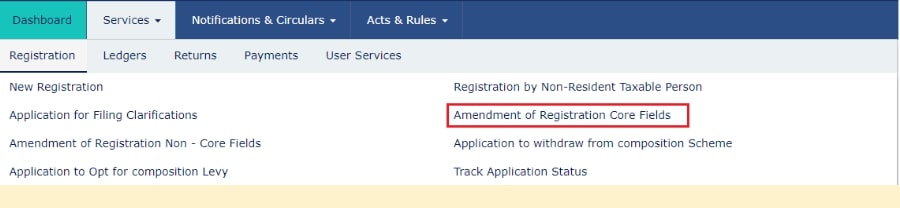
After logging in, click on the ‘Services’ tab. Then select ‘Registration’, and from the options, click on ‘Amendment of Registration – Core Fields’.
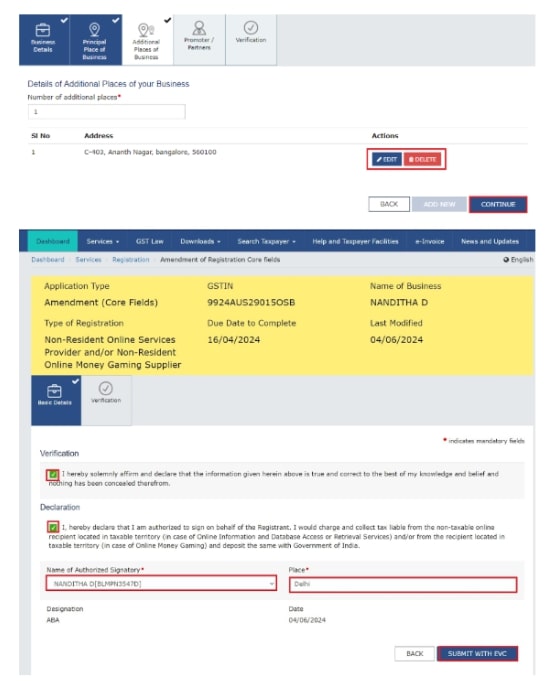
You will see different tabs to make changes. Click on the tab called ‘Additional Place of Business’ to update or add your new business location.
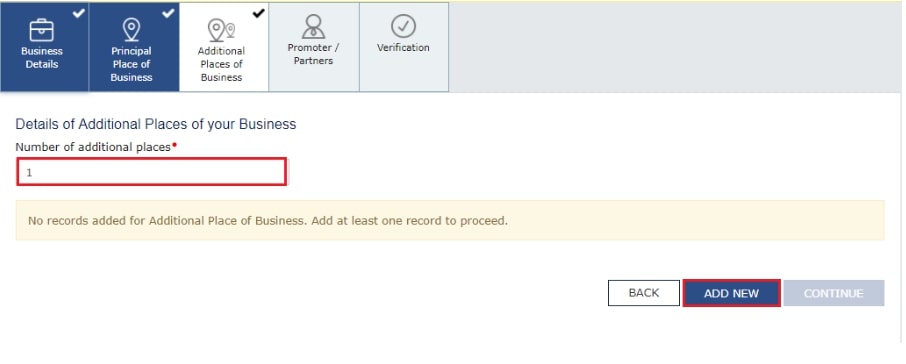
Clicking the 'Additional Place of Business' tab opens a new page where you can add or edit your locations.
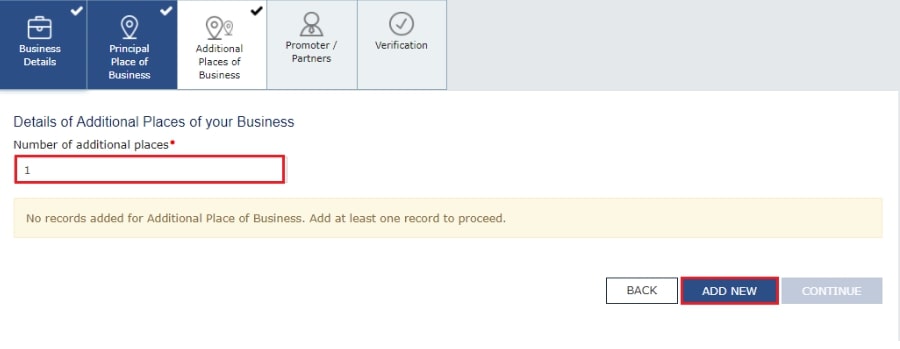
Click on the ‘Add New’ button and fill in all the required details. You also need to enter the reason for the amendment and the date of amendment. After entering the details, click on ‘Save. ’
In the address section, you can either type the full address, PIN code, or latitude and longitude (for example: 22.48, 77.89, 22,7). When you enter at least 2 characters, the system will show auto-suggestions in the “Enter Address or Latitude, Longitude” search box on the top right corner of the map.
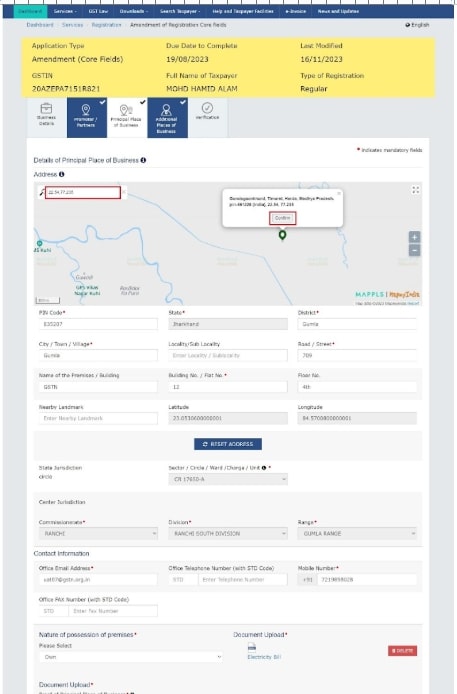
Note: If your business doesn’t have any Additional Place of Business added yet, first go to the ‘Principal Place of Business’ tab. Then, select ‘Yes’ under the option ‘Have Additional Place of Business’ to add a new one.
You can also edit the existing address of an already added Additional Place of Business if needed.
Click on the ‘Verification’ option.
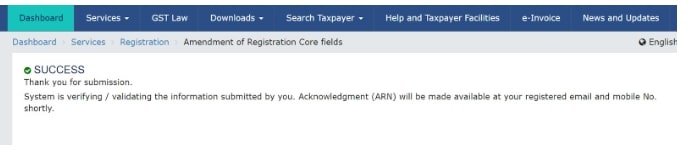
After you submit the application, a message saying ‘Successful submission’ will appear on your screen.
Within 15 minutes, you will get an acknowledgement on your registered email and mobile number.
Since this is a core field change, it needs to be approved by a GST officer. Once they review it, you will receive an SMS and email saying whether your request is approved or rejected.
To add a new business location under GST, you need to submit proper documents that prove your right to use the place, whether it’s owned, rented, or shared.
When you add a new place under GST, you must give proper documents to show that you are using that place legally. These documents depend on whether the place is owned, rented, shared, or based on the type of business you have.
Below are the different types of address proofs you can use.
If you own the property, you need to submit any one of the following:
If you're using a rented or leased space, provide:
If you're using space in someone else’s property without rent:
Note: Board Resolution is not mandatory for DSC-based filing if the authorized signatory is a director whose name is already registered on the GST portal.
If you want to remove an Additional Place of Business (APOB) from your GST registration, you can do it online through the GST portal. The process is simple and similar to adding a new place. You need to file a Core Field Amendment in your GST profile.
Here’s what you need to do:
Once your request is submitted, it will be reviewed by a GST officer. If everything is correct, the APOB will be removed from your registration.
If you do not register your Additional Place of Business (APOB) under GST, it can lead to serious problems for your business.
If the GST department finds out that you are operating from an unregistered place, they can impose a penalty of Rs. 10,000 or the amount of tax evaded, whichever is higher.
You may lose your right to claim ITC on goods stored or sold from the unregistered place. This can increase your overall tax burden.
Goods stored or moved from an unregistered location can be seized during inspection, and you may have to pay fines to get them released.
Your entire GST registration can be suspended or cancelled if found non-compliant during a GST audit or investigation.
Non-compliance can lead to legal notices, audits, and damage to your business reputation, especially if you sell on platforms like Amazon or Flipkart.
Connect with Startupease and let our experts handle
the legal hassle while you grow your business.